Showing posts with label Design Patterns. Show all posts

Friday, June 26, 2015

Reactive Programming: Reactive Extensions Library (Starting to learn this reactive thing)


I found a great video explanation of Reactive Programming in the flavour of Reactive Extensions Library done by Jafar Husain (Technical Lead at Netflix) . Here's a brief summary of the main concepts I extracted.

Event Reacting
The term Reactive can be associated by analogy with someone throwing a lot of balls at you at the same time. You need to react quickly to try to catch them all. You don't have control over when you want the balls to be thrown at you, you just need to be prepared to catch them.

To start understanding Rx (Reactive Extensions), we need to have two basic design patterns in consideration: Iterator and Observer.

In Java we have an Iterable interface, which is an interface any type of collection can implement to allow consumers of a collection obtain items one at the time. That's how in Java we can use the foreach operator to traverse a collection. Because the interface provides a specific Iterator for the data type we are consuming in the collection. Three things can happen when using an iterator:
  1. Get the next item
  2. No more items to consume (end of the data stream)
  3. An error can happen (using exception throwing in languages like Java)
The Observer pattern is another well known design pattern where suscribers get suscribed to subjects in order to be notified when a change occurs in the subject. If we analize this pattern, we can find that it's very similar to the Iterator pattern in the sense that there is a producer and a consumer. Main difference is that in the Observer the producer is in control for when sending the data, while in the Iterator the consumer is in control. He decides when to pull the data from the producer.

Iteratot Observer Fusion
But there are two main things "missing" from the Observer pattern that are present in the Iterator:
  • A way to indicate there is no more data
  • A way to indicate an error ocurred
In the Observer you can only suscribe callback to receive data, but you cannot register callbacks for the event where is indicated no more data is going to be pushed (completion event), or to indicate an error happened. Reactive extensions is basically about unifying the observable pipe with the iterable pipe producing a new type called the Observable. It gives the same semantics of both the Iterable and the Observable.

There are a lot of interesting operations that can be done over iterables. Similar to SQL where there are a lot of operations that can be done over sets: filter, select, order, etc. What about if all the same things we can do over data sets residing in a table, could also be done over events (data arriving in). That is not a dream with Rx. It is possible to write SQL style queries over events. The difference is that the query is evaluated as data arrives. You can evaluate data in real time.

More and more code is becoming evented. We have a lot of asynchrouns calls both in client side (JS), and server side (Node.JS). That adds a lot of complexity in the application trying to handle all these
callbacks. The reactive extensions library provides this new Observable data type that establishes a powerful way to model events. By completing the missing semantics (end of data stream and error), you can now apply operations familiar in collections like map, filter, reduce, merge, zip, etc. All those things that could be done over data streams we can pull, now can be done over streams of data we can push.

Imagine the new Java 8 Stream API over data that is arriving dynamically over events pushed to you. Lot of things can improve in an application like serving faster data to consumers just to cite an example.

Still need more learning for this new paradimg, but at least I think this video covers fundamental concepts we need to have before getting our hands into the code.

Monday, January 7, 2013

Design Patterns Short Test


A time ago I prepared this test for a course in the internal training program of the company I worked for. I gave a quick training of design patterns using the most common ones as described in the Gang of Four book. You can get it from my drive in Google, or read it here. 


  1. The follow applicability a system should be configured with one of multiple families of products.”, describes the pattern:
    1. Builder
    2. Decorator
    3. Singleton
    4. Abstract Factory

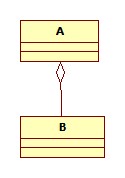
  1. The diagram below is read as
                             
  1. A is an aggregate class
  2. B implements A
  3. B extends from A
  4. A is an abstract class

  1. These two patterns can be used for undo operations.
    1. Decorator & Visitor
    2. Memento & Command
    3. Factory Method & Chain of Responsibility
    4. Command & Observer

  1. Loose coupling is when
    1. A class has just a small number of lines of code
    2. An application is designed with a small set of classes
    3. Reflection is used to instance the objects
    4. A class has little knowledge of another implementing class


  1. Which pattern uses a pool to share objects instead of instancing an excessive amount of them?
    1. Adapter
    2. Flyweight
    3. Proxy
    4. None of above


  1. Which of the follow is a general principle of class designing?
    1. Favor inheritance over composition
    2. Avoid polyphormism
    3. Use only creational patterns
    4. Favor composition over inheritance

  1. Incompatible interfaces can be overcome with the pattern:
    1. Interpreter
    2. Observer
    3. Adapter
    4. Bridge

  1. Which statements are correct about design patterns?
    1. They are proven solutions to common design problems
    2. They benefit code reusability
    3. They provide a common language among programmers
    4. All mentioned

  1. The capacity to add responsibilities on runtime to individual objects, that is, without affecting other objects, can be accomplished with this pattern.
    1. Decorator
    2. Proxy
    3. State
    4. Façade

  1. One applicability of the Observer pattern is :
    1. When a class should have all its attributes declared as public
    2. When an object should be able to notify others about an event
    3. When a class should have all its methods declared as public
    4. All of them

  1. Which pattern is represented in this diagram?
    1. Composite
    2. Prototype
    3. Façade
    4. Singleton

  1. Which pattern is being used in this line of code?
MyPattern s1 = MyPattern.Instance();

  1. Singleton
  2. Prototype
  3. Factory Method
  4. Command

  1. Which type of pattern is described in the next sentence: “Are concerned with algorithms and the assignments of responsibilities between objects”
    1. Creational
    2. Structural
    3. Behavioral
    4. None

  1. This pattern has two types: virtual & security.
    1. Façade
    2. Iterator
    3. Singleton
    4. Proxy

  1. Suppose there is a class that has a request, but you don’t want to hard code the class that will satisfy that request, but more than one class can satisfy it. You will use the follow pattern:
    1. Façade
    2. Chain of responsibility
    3. Proxy
    4. Command

Tuesday, November 6, 2012

Tres Amigos of Persistance (DAO - DAOFactory - BO)

Nowadays, even with all the good accumulated knowledge we have in design patterns, software engineers still tend to program classes where business logic is mixed with persistence logic. Even some experienced developers omit this important aspect of software architecture maybe for lack of knowledge, or just for the rush to start programming quickly. I consider the last reason is the most common of all. 

Now why should we bother too much about this separation? well, the idea is not to develop a case for what is basic in software architecture: multi-tier(layer) programming, but to help with some useful patterns to accomplish this fundamental aspect of a well design application. I think almost everyone is aware of this principle but I know for experience that for many it is not so obvious how we can meet all the details of persistence logic independence. 

First let's start with the most known pattern: Data Access Object (DAO). Citing from one design patterns book I have [1]:

Problem: You want to encapsulate data access and manipulation in a separate layer
 Forces:

  1. You want to implement data access mechanisms to access and manipulate data in a persistence storage.
  2. You want to decouple the persistent storage implementation from the rest of your application.
  3. You want to provide a uniform data access API for a persistent mechanism to various types of data sources, such as RDBMS, LDAP, OODB, XML repositories, flat files, and so on.
  4. You want to organize data access logic and encapsulate proprietary features to facilitate maintainability and portability. 


 The DAO classes will contain all the logic to connect for example to a database and get the needed data from the corresponding tables. One important aspect of this DAO is that any implementation should always avoid to return any persistence proprietary object. For example if someone codes a DAO where the returned object is a ResultSet, the class wouldn't be meeting the point #4. The application would be coupled to the JDBC implementation. That is why in the next UML diagram the returned object from the DAO is a "TransferObject". 

We don't have to get into much details of TransferObject pattern but I can say with just having domain objects is enough to ensure decoupling with business and persistence layers.

Having implemented the DAO pattern in our app does not decouple in 100% the business layer from the persistence one. Imagine for example you have this DAO class and the client that consumes it:
package com.foo.dao.jdbc;

class FooDAOJDBCImpl {
 public void updateFoo(Foo foo) {  
  ...
 }
}

public class FooClient {
 void updateChangesInFoo(Foo foo) {
  com.foo.dao.jdbc.FooDAOJDBCImpl fooDAOJDBCImpl = new com.foo.dao.jdbc.FooDAOJDBCImpl();
  fooDAOJDBCImpl.update(foo);
 }
}

Notice that the client needs to instantiate directly the JDBC implementation. Even though it is hidden for the client how the DAO class internally updates the data in the data source, the client still knows that the implementation uses JDBC to persist data. If the JDBC implementation has to be replaced by another one, the client code will have to be updated to use the new DAO class. 

To make our design more flexible to such type of possible changes, and also to have our code prepared for unit testing (use of mock DAO classes), we can marry our DAO pattern with the AbstractFactory pattern to have a child named DAOFactory. The DAOFactory class uses reflection (one way to do it) to instantiate the DAO class.


public interface DAO {

}

public interface FooDAO extends DAO {
 public void update(Foo foo);
}

package com.foo.dao.jdbc;
public class FooJDBCImpl implements FooDAO {
 public void update(Foo foo) {
  ....
 }
}

public class FooClient {
 void updateChangesInFoo(Foo foo) {
  FooDAO dao = (FooDAO) DAOFactory.getDAO("foo") ;
  dao.update(foo);
 }
}


It is not until execution time that is known what DAO class will be used to execute the persistence method. The name of the classes can be stored in a properties file. If the implementation of the DAO class is changed, it will be totally transparent to the Client class.

/**
Properties in some file:
foo=com.foo.dao.jdbc.FooDAOJDBCImpl
foo2=com.foo.dao.jdbc.Foo2DAOJDBCImpl

**/

import java.io.FileInputStream;
import java.io.FileNotFoundException;
import java.io.IOException;
import java.util.Properties;

public class DAOFactory {
 
 private static Properties props = new Properties();
 private static boolean loadedProperties = false;
 private static String propertiesPath;
 
 public static void init(String propertiesPath) {
  propertiesPath = path;
 }

 public static DAOFactory getDAO(String name) {
  try {
   
   Class daoClass = Class.forName( getClass( name ) ); 
   return (DAO) daoClass.newInstance();   
  }
  catch (ClassNotFoundException e) { 
   e.printStackTrace();
   return null;
  }
  catch (Exception e) {
   e.printStackTrace();
   return null;   
  }

 }
 
 private static String getClass( String propertyName ) {
  String className = null;
  try {
 
   if ( !loadedProperties ) {
    
    FileInputStream file = new FileInputStream( propertiesPath );
    props.load( file );    
    loadedProperties = true;
   }

   className = props.getProperty( propertyName, "");
   if ( className.length() == 0)
    return null;
  }
  catch ( FileNotFoundException e) { 
   e.printStackTrace();
  }
  catch ( IOException e) {   
   e.printStackTrace();
  }
  catch (Exception e) {
   e.printStackTrace();
  }
  return className;
 }

}

The last design pattern to complete our gang is the Business Object (BO). I'm still learning how to use it correctly, I just realized writing this post that I have some fixes to do in a current implementation I have. But anyways, one of the main purposes of this pattern is to separate the persistence logic from the business logic. Normally in our applications we have a complex conceptual model containing structured, interrelated composite objects. Those complex composite relationships between classes require a lot of logic just to persist. So to avoid mixing these two logic's, an intermediate layer between business logic and data access is created; the BO's layer. 

Let's suppose we have a class Foo containing a list of Foo2 objects:

public class Foo {
 private List<oo2> foo2s;
 private String someAttribute; 

}
public class Foo2 {
 private String someAttribute;
} 
If we want to persist our Foo class, we create two BO classes. The FooBO is the main entry point to save all the composite objects contained inside Foo2 domain class.
 public class FooBO {
 
 public void saveFoo(Foo foo) {
  FooDAO fooDAO = (FooDAO) DAOFactory.getDAO("foo") ;
  fooDAO.saveBasicFooInfo(foo);
  Foo2BO foo2Bo = new Foo2BO();
  
  for (Foo2 foo2 : foo.getFoo2s()) {
    foo2Bo.saveFoo2(foo2);
  }  
 }
}

public class Foo2BO {
 public void saveFoo2(Foo foo) {
  FooDAO2 fooDAO2 = (FooDAO2) DAOFactory.getDAO("foo2") ;
  fooDAO2.saveFoo2(foo2);
 }
}
There can be different ways to implement any of the 3 patterns described in this post; nothing is written in stone in the programming field. The idea was to provide a quick look on these three main patterns. If anyone has anything interesting to add, comments are well welcome. [1] Deepak Alur, John Crupi, Dan Malks. "Core J2EE Patterns, Best Practices and Design Strategies", 2003. Pags: 462,463.

Friday, November 2, 2012

Using Observer Pattern to track progress while loading a page

Have you ever been in a site where there is a heavy process that takes a long time in finishing? If the web page is not user friendly designed, you may end it up with an annoying forever loading page. If we want to avoid this feeling of slowness in our pages, we should consider adding a progress indicator in the page to show how much is left until process is finished. To accomplish this we can take advantage of the Observer pattern. To do this we need to run the process asynchronously, or in other words, running it as a different thread. The next diagram shows how the long process is contained in Thread class.


The following class is going to emulate a long process by taking various naps.

package com.gsolano.longprocess

import java.util.Observable;

/**
 * Class with an observable mock long progress.
 * @author gsolano
 *
 */
public class LongProcess extends Observable {
 
 /**
  * Keeps the progress of the process.
  */
 protected Float progress;
 
 /**
  * Simulates a long process.
  */
 public void start() {
  int n =10;
  for (int i=0;i <= n; i++) {
   progress = (float)i/(float)n * 100; // Calculates progress.
   try {
    Thread.currentThread();
    Thread.sleep(2000);  
    this.setChanged();
    this.notifyObservers(progress);
   } catch (InterruptedException e) {   
    e.printStackTrace();
   }
  }  
 }
}


The progress of this class is calculated in every iteration, notifying also the observers with the change in the progress. The next class will observe the LongProcess class.

package com.gsolano.longprocess;

import java.util.Observable;
import java.util.Observer;

/**
 * Observer class
 * 
 * @author gsolano
 */
public class LongProcessObserver implements Observer{

 protected Float progress;
 /**
  * Tracks the progress of the long process.
  * @return
  */
 public Float getProgress() {
  return progress;
 }

 public void update(Observable o, Object arg) {  
  progress = (Float) arg;  
 }
}


To complete the diagram shown before, we need to create a class extending from Thread to wrap the LongProcess and be able to launch in a separate thread.

/**
 * 
 * Class to run a LongProcess in a separate thread.
 * 
 * @author gsolano
 *
 */
public class LongProcessThread extends Thread {
 
 private LongProcess longProcess;
 
 public LongProcess getLongProcess() {
  return longProcess;
 }

 public void setLongProcess(LongProcess longProcess) {
  this.longProcess = longProcess;
 }

 @Override
 public void run() {
  if(longProcess != null) {
   longProcess.start();
  }
 }
}


Now, let’s jump to the web application side. In the next struts action class we handle two events:

1.Start the long process:
  a .Long process is created.
  b. Observer is added to the long process.
  c. Long process is run in a separate thread.
  d. Observer is saved in session variable.

2.Send an update on the progress of the long process
  a. Observer is retrieved from session.
  b. Progress value is taken from observer and written to response.

import javax.servlet.http.HttpServletRequest;
import javax.servlet.http.HttpServletResponse;
import org.apache.struts.action.Action;
import org.apache.struts.action.ActionForm;
import org.apache.struts.action.ActionForward;
import org.apache.struts.action.ActionMapping;

public class FooProgressAction extends Action{
 
 @Override
 public ActionForward execute(ActionMapping mapping, ActionForm form,
   HttpServletRequest request, HttpServletResponse response)
   throws Exception {
  
  String action = request.getParameter("action");
  
  if(action != null) {
   if(action.equalsIgnoreCase("progress")) { // If action is ajax request to get progress.
    // Get the observer.
    LongProcessObserver longProcessObserver = (LongProcessObserver)
      request.getSession().getAttribute("observer");
    if(longProcessObserver != null) {
     // Get the progress from the observer.
     Float progress = longProcessObserver.getProgress();
     if(progress != null) {
      // Send the progress to the page.
      response.getWriter().write(progress.toString());
     }
     return null;
    }
   } else if(action.equalsIgnoreCase("start")) { // Did someone click the start button?
    launchLongProcess(request); 
   }   
  }
  return mapping.findForward("success"); 
 }

 private void launchLongProcess(HttpServletRequest request) {
  LongProcess longProcess = new LongProcess();
  LongProcessObserver observer = new LongProcessObserver();
  // Add the observer to the long process.
  longProcess.addObserver(observer);
  // Launch long process in a thread.
  LongProcessThread longProcessThread = new LongProcessThread();
  longProcessThread.setLongProcess(longProcess);
  longProcessThread.start();  
  // Keep the observer in session.
  request.getSession().setAttribute("observer", observer);
  // Send a flag indicating that party just started!
  request.setAttribute("processStarted", true);
 }
}

In the client side we just need some logic to start the Ajax cycle to ask for progress update until it reaches the 100%.

<%@ taglib uri="/WEB-INF/tld/c.tld" prefix="c" %>

<html>
<head>
 <script language="Javascript">
 var seconds = 1;  
 var run = false;
 var ajaxURL;
 
 function checkProgress(url) {
  if(typeof url != 'undefined') {
   ajaxURL = url;
  } 
    
  var xmlHttp;
  try {
   xmlHttp = new XMLHttpRequest(); // Firefox, Opera 8.0+, Safari
  } catch (e) {
   try {
    xmlHttp = new ActiveXObject("Msxml2.XMLHTTP"); // Internet Explorer
   } catch (e) {
    try {
     xmlHttp = new ActiveXObject("Microsoft.XMLHTTP");
    } catch (e) {
     alert("Ajax not supported");
     return false;
    }
   }
  } 
  xmlHttp.onreadystatechange = function() {
   if (xmlHttp.readyState == 4 ) {
    var progress = xmlHttp.responseText;
    if(progress == 100.0) {
     document.getElementById('progress').innerHTML = "Finished!!"; 
     return;
    }else {
     if(progress) {
      document.getElementById('progress').innerHTML = progress + "%";
     }    
     setTimeout('checkProgress()', seconds * 1000);
    }
   }
  };
  xmlHttp.open("GET", ajaxURL, true);
  xmlHttp.send(null);
 }
 </script>
</head>
 <body>
 <div style="position: absolute; left:40%; text-align:center; border: 1px solid; margin: 20px; padding:20px; width: 150px;">
  <form action="${pageContext.request.contextPath}/longProcess.do">
   <input type="hidden" name="action" value="start" />
   <input type="submit" value="Start!" />
  </form>
  
  <div id="progress"></div>
  
  <c:if test="${not empty processStarted}">
   <script language="Javascript">
    setTimeout('checkProgress(\'${pageContext.request.contextPath}/longProcess.do?action=progress\')', 1000);
   </script>
  </c:if>
 </div>
 </body>
</html>

Result: